








Bluey: Let's Play!


Installs
10M+Category
OfflineContent Rating
Rated for 3+
Screenshots
Game Overview
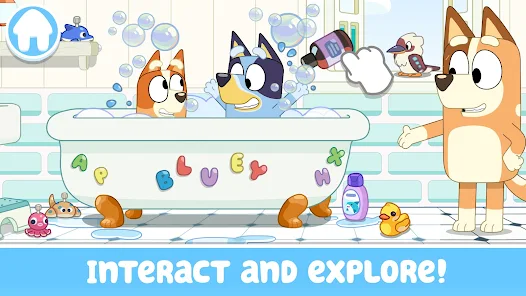
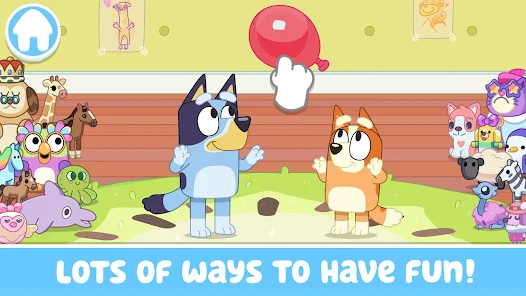
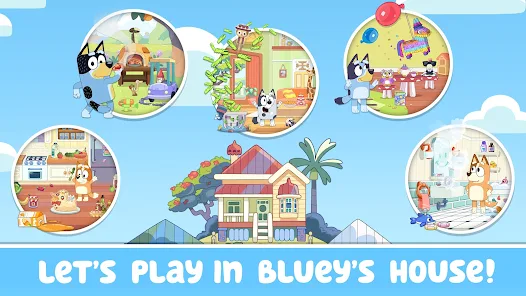
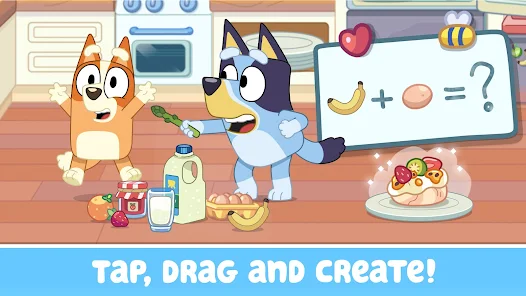
Bluey: Let's Play! is a delightful collection of mini-games for kids based on the beloved Australian animated TV show. This game lets children step into the colorful world of Bluey and her family, playing through fun, interactive activities inspired by episodes. The core gameplay involves tapping, dragging, and exploring different locations like the Heeler house and the park to complete simple tasks. Kids can play classic games like 'Keepy Uppy' with a balloon, have a pretend market stall, or help Bandit make a smoothie. The mechanics are designed to be intuitive for young players, focusing on creativity and imaginative play rather than complex challenges. You'll find familiar items from the show, like Chattermax and the magic xylophone, and interact with the entire Heeler family IP, including Bluey, Bingo, Bandit, and Chilli. The game is free to play and download, with optional in-app purchases for additional content or to remove ads. It runs smoothly on most modern Android phones and tablets, as well as iOS devices like iPhones and iPads. For Android users, you can free download the latest apk of Bluey: Let's Play! right on this page and install it easily. The game is also officially available on google play and the apple store for a safe and secure install.
Playing Bluey: Let's Play! feels like being part of the Heeler family's adventures. Each mini-game is a short, joyful experience that captures the spirit of the show, encouraging kids to use their imagination. There's no pressure or scores, just open-ended fun where the goal is to play and explore. You might help Bluey and Bingo build a fort, or play a game of 'Shadowlands' in the backyard. The touch controls are very simple, perfect for little fingers to master. The game includes beloved characters and iconic items that fans will instantly recognize, making it a truly authentic Bluey experience. While the base game is free, there are in-app purchases available, such as unlocking all episodes or getting special costume packs for the characters. This makes Bluey: Let's Play! accessible to everyone while offering more for families who want it. The app is optimized for a wide range of devices, ensuring a smooth play experience. Remember, you can get Bluey: Let's Play! by downloading the apk from here or finding it on official platforms like google play and the apple store for a trusted install.
One of the best parts of Bluey: Let's Play! is how it turns screen time into creative, engaging play that mirrors the themes of the TV series. The game doesn't just entertain; it often involves simple problem-solving or storytelling, like deciding what to 'sell' at a market or how to decorate a cake. It's a safe, ad-free environment for kids, especially if parents choose to make the optional in-app purchase to remove advertisements. The graphics and sounds are bright and cheerful, directly taken from the show, which adds to the immersive feel. Whether your device is an Android tablet or an iPhone, Bluey: Let's Play! runs well and provides hours of gentle fun. To start playing, the easiest way is to free download the apk file for Bluey: Let's Play! from this site and follow the install instructions. Of course, you can also always go directly to google play or the apple store to download and install Bluey: Let's Play! officially, ensuring you get the latest updates and features for the game.
Games You Might Also Like
If you enjoy the imaginative and family-friendly play of Bluey: Let's Play!, you might also like Toca Life World. This game offers a huge digital dollhouse where kids can create stories and explore different locations, similar to how Bluey lets you play in the Heeler house. It encourages open-ended creativity, letting you mix and match characters and items to make your own adventures. The key difference is its scale; Toca Life World is a massive collection of locations and characters, while Bluey: Let's Play! focuses on specific, show-based activities. You can play, install, and download Toca Life World for free on both google play and the apple store, with many in-app purchase options to expand your world.
Another great game similar to Bluey: Let's Play! is Pepi Play. It features cute characters in various playful scenarios, like a house, hospital, or farm, where kids can interact with everything on screen. It shares Bluey's focus on exploration and gentle, tap-based gameplay without strict rules. The difference is that Pepi Play has its own original characters and more surreal, toy-like environments compared to Bluey's recognizable TV setting. It's perfect for fostering creative storytelling. You can find Pepi Play on google play and the apple store to download and install, offering a free play experience with additional content available for purchase.
For fans of character-driven fun, PAW Patrol Rescue World is a solid choice. Like Bluey: Let's Play!, it's based on a popular kids' show and lets you complete simple missions with beloved characters in an open world. The gameplay involves helping the pups solve problems, which is similar to completing tasks in Bluey's mini-games. The main difference is PAW Patrol has more of a rescue-themed objective structure. It's easy to play and very engaging for young children. You can get it through a free download and install from google play or the apple store, ready for adventure just like Bluey: Let's Play!.
Download the App
Online Games







Disclaimer
1 . Gameyay does not represent any developer, nor is it the developer of any App or game.
2 . Gameyay provide screenshots, historical version Apk, links and other information, which we collected from Google Play. We will also add our own reviews to provide users with more information to choose.
3 . All trademarks, registered trademarks, product names and company names or logos appearing on the site are the property of their respective owners.
4 . Gameyay abides by the federal Digital Millennium Copyright Act (DMCA) by responding to notices of alleged infringement that complies with the DMCA and other applicable laws.
5 . We guarantee the security of apk files downloaded from our site and also provide the official download link at Google Play Store and App Store.
6 . If you are the owner or copyright representative and want to delete your information, please contact us [email protected].
7 . All the information on this website is strictly observed all the terms and conditions of Google Ads Advertising policies and Google Unwanted Software policy.