












Unfolded: Webtoon Stories


Installs
500K+Category
RomanceContent Rating
Teen
Screenshots





Game Overview
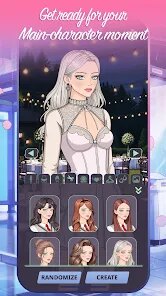
NANOBIT, a studio known for its innovative approach to interactive storytelling, has crafted "Unfolded: Webtoon Stories," a unique blend of visual novel and mobile game that redefines how we experience digital comics. This game belongs to the narrative-driven genre, where player choices directly influence the plot, but with a twist: it adapts the webtoon format—vertical, scrolling panels with vivid art—into an interactive experience. The sound effects and art direction are a standout; the soundtrack is a mellow, orchestral score that shifts with emotional beats, while the hand-drawn, anime-inspired visuals pop with vibrant colors and fluid animations, making each panel feel alive. The storyline weaves together multiple original webtoon shorts, focusing on themes of love, loss, and self-discovery, with branching paths that ensure high replayability.
Special gameplay techniques include a "tap-and-scroll" mechanic for navigating panels, plus quick-time events where you decide dialogue or actions by swiping, which triggers dynamic changes in character expressions or scene transitions. This creates a seamless flow between reading and playing, immersing you deeper into the narrative. My overall evaluation is positive; it is a refreshing take on interactive fiction, perfect for fans of webtoons and branching stories. However, a notable flaw is the pacing in some story arcs, where dialogue-heavy sequences can drag, reducing engagement. Also, the controls sometimes feel unresponsive during fast swipes, breaking immersion. Despite this, the game excels at blending art and interactivity, delivering an emotional punch that lingers.
One more drawback is the limited roster of stories at launch, which might leave you craving more variety. Yet, the writing is sharp, with well-developed characters that avoid cliches. The sound design, from subtle ambient cues to dramatic crescendos, amplifies key moments, while the art maintains a consistent, polished look across all tales. For a first-time player, the intuitive interface is a plus, but the lack of a tutorial for advanced interactions (like multi-step branching) can be confusing. Overall, "Unfolded: Webtoon Stories" is a compelling experiment that mostly succeeds, offering a fresh way to engage with stories—perfect for your commute or a quiet evening.
Games You Might Also Like
🌟 Step 1: Download and launch "Unfolded: Webtoon Stories" from your app store. After the opening cinematic, you'll land on the main menu—tap "Start New Game" to select a webtoon from the initial roster. Each has a brief synopsis, so pick one that hooks you (e.g., a romance or thriller).
🔍 Step 2: Once inside, you'll see vertical panels designed like a webtoon. Swipe up or tap on the bottom of the screen to scroll through the story. Pay attention to dialogue boxes; some have highlighted words indicating decision points—don't rush.
⚡ Step 3: When a choice appears (e.g., a character asks a question), you'll see two or more options popping up. Tap one instantly; you have a few seconds before a default selection kicks in. The game tracks your choices, affecting character relationships and story outcomes.
💡 Step 4: Look for interactive objects in panels, like glowing icons or characters' eyes. Tap them to trigger animations, sound cues, or hidden backstory. For example, tapping a mysterious shadow might reveal a flashback—exploration unlocks secrets.
🎮 Step 5: Master the swipe mechanics for action sequences. When a bar appears at the screen's bottom, swipe in the direction shown (e.g., left for dodge, right for attack). Timing matters: a perfect swipe grants bonus story nodes, while a miss skips them, altering the path.
📊 Step 6: After each chapter, check the "Story Map" from the menu. It shows branching points you've hit and potential outcomes. Use this to plan subsequent playthroughs or reload a chapter if you want a different result—save your progress manually before key decisions.
🏆 Step 7: Complete all stories to unlock "Sandbox Mode," where you can replay scenes with free choices no limits. Use this to grind for hidden Easter eggs, like alternate endings or character skins, which enhance replay value. Keep an eye on in-game achievements for extra rewards.
Download Apk File
Online Games







Disclaimer
1 . Gameyay does not represent any developer, nor is it the developer of any App or game.
2 . Gameyay provide screenshots, historical version Apk, links and other information, which we collected from Google Play. We will also add our own reviews to provide users with more information to choose.
3 . All trademarks, registered trademarks, product names and company names or logos appearing on the site are the property of their respective owners.
4 . Gameyay abides by the federal Digital Millennium Copyright Act (DMCA) by responding to notices of alleged infringement that complies with the DMCA and other applicable laws.
5 . We guarantee the security of apk files downloaded from our site and also provide the official download link at Google Play Store and App Store.
6 . If you are the owner or copyright representative and want to delete your information, please contact us [email protected].
7 . All the information on this website is strictly observed all the terms and conditions of Google Ads Advertising policies and Google Unwanted Software policy.